
Your independent practice, with the back office built in.
Take direct referrals from insurers and law firms under your own practice profile. Referrers submit through your referral page, claimants book themselves into your availability, and you deliver the report and invoice from the same place.
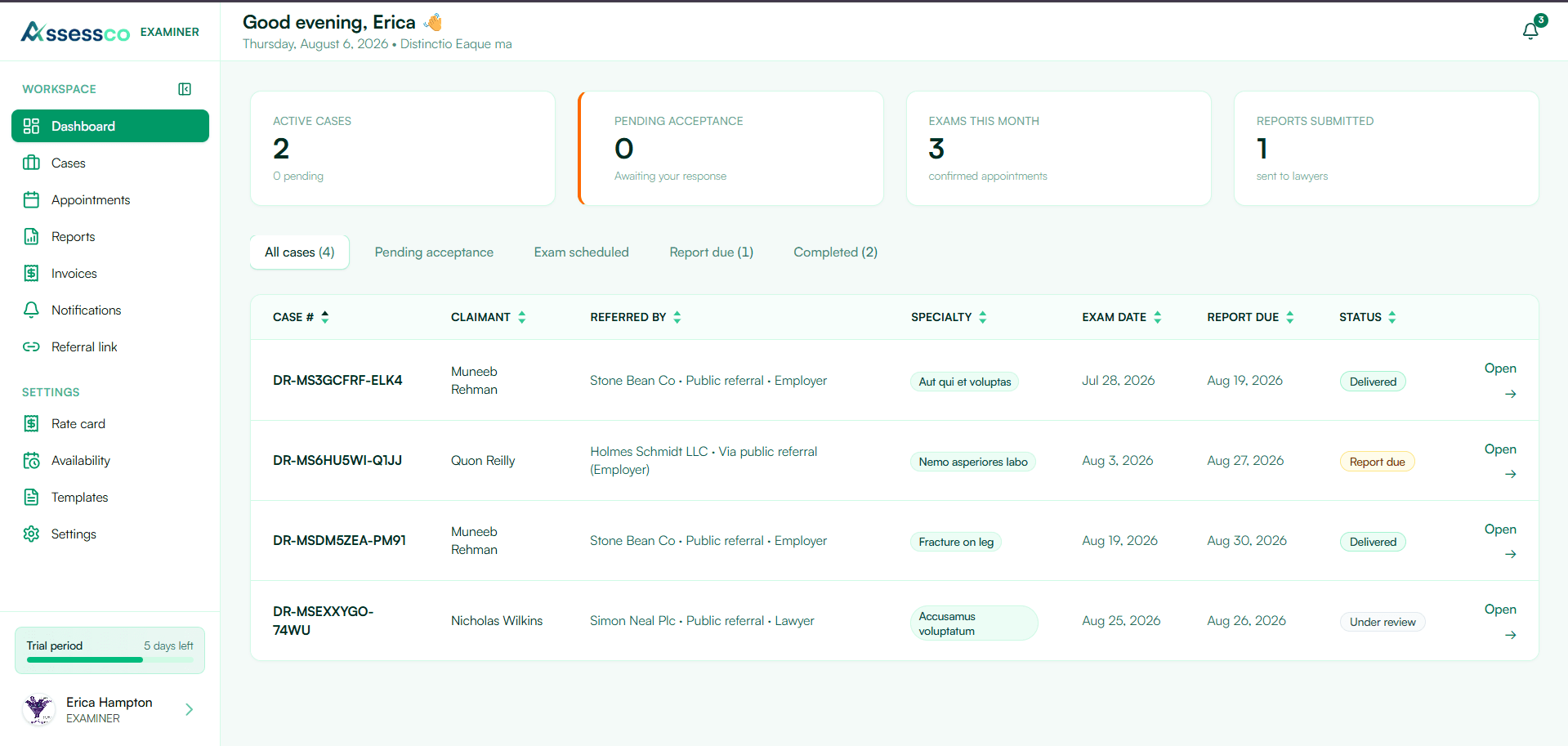
You can do the assessments. It's everything around them.
Working directly with referrers pays better than agency work — but only if the admin doesn't eat the difference.
Referrals arrive incomplete
An email with a name and a claim number. You then have to write back for the accident date, the treating records, and the actual questions in issue.
You're doing the booking
Calling claimants between appointments, leaving voicemails, rescheduling no-shows — from your own clinical time.
No professional front door
Referrers who'd send you work have no way to find you, check your specialty and location, or refer without a phone call first.
Reports sent by plain email
Medical opinions on a claimant going out as an unprotected attachment, with no record of who opened it or when.
Invoicing from scratch
Rebuilding an invoice per assessment type, chasing payment, and reconciling it against which exams actually happened.
Status requests
Referrers emailing to ask whether the exam happened and when the report is coming — each one an interruption.
An afternoon to configure, then it runs itself
Build your practice profile
Practice name, logo, specialty, languages, city and province, background, and how many assessments you'll take. This is what referrers see.
Set your availability and rate card
Mark the days and times you'll examine, and price each assessment type in CAD. Claimants book inside your availability; invoices use your rate card.
Write your intake questions
Define the questions every referrer must answer before you'll accept a file — mechanism of injury, questions in issue, records enclosed.
Publish and share your referral link
A referral page at your own address for your email signature. Switch on directory listing to appear where insurers and counsel search by specialty and city.
What a direct referral looks like once you're live
Cases arrive — or you create them
Referrals come through your public profile at /examiners or your referral link at /r/your-clinic. You can also create cases yourself when work arrives by phone or email.
Accept or decline in one click
Review the case and take it, or decline with a reason. When you accept, the person who submitted the referral gets a private referral status page link — no account needed.
Availability link, then you confirm
You send the claimant a scheduling or availability link. They select time slots; you confirm one from their choices — no phone calls either way.
Write the report, send to the submitter
Draft in the built-in editor or upload a finished PDF, then send it directly to whoever submitted the case — by email and on their status page.
Private referral status page
From the tokenised link sent when you accepted the case, they track status, download the report, view invoices, and message you — without logging in.
Invoice from your rate card
Raise the invoice against the case at your set rate. It's visible to the submitter on their status page — no separate email step.
Your referral page
A branded form at your own address — referrer and claimant details, claim type, your custom intake questions, and document upload. Share the link in your email signature or from your directory profile.
You keep your agency work
If you also take assignments from IME companies, those appear in a separate examiner workspace under the same login. Your independent practice and network cases stay cleanly separated.
Everything a solo practice needs, nothing it doesn't
Public profile & directory listing
An indexable profile showing specialty, location, languages, and availability — with directory listing you can switch on or off.
Your own referral link
A branded referral form with your practice logo, your intake questions, and document upload.
Case management
Accept or decline, see every case's stage, and keep a message thread with the referrer on the file itself.
Appointments & availability
A week calendar of your exams, claimant self-scheduling, and availability links when you'd rather propose times yourself.
Reports
Draft in the editor or upload a PDF, then send it to the referrer. Amendment requests come back to you on the case.
Rate card & invoices
Set a price per assessment type in CAD, raise invoices against cases, and let referrers see their invoice history.
Intake questions
Make referrers give you what you need up front, so you stop writing back for the accident date and the questions in issue.
Referrer tracking portal
Referrers follow the case, download the report, and message you from a secure link with no account to create.
Secure report delivery
Reports download as password-protected PDFs, documents sit in encrypted storage, and case actions are written to an audit trail.
Insurers, law firms, and service providers on the same platform
Independent examiners sit at the centre — referrers and vendors connect through their own portals.
Insurers & adjusters
Submit referrals, track cases, and download reports securely through the referrer portal.
Law firms & counsel
Search the examiner directory by specialty and city, then refer directly to your practice.
Service providers
Transport and interpretation vendors manage bookings and invoices tied to your cases.
The three things that actually save you hours
Referrals arrive complete
Your intake questions are mandatory on your referral form. You stop the back-and-forth before it starts, and you can judge whether to accept a file on first read.
You never book an appointment
Claimants schedule themselves inside your availability and you just confirm. That's the single largest admin task in an independent practice, removed.
Referrers stop asking for updates
Their tracking link shows the status, the report, and the invoices. Every status email you don't have to answer is time back.
What examiners ask before signing up
Does Assessco send me referrals?
Assessco isn't a referral agency and doesn't take a cut of your fee. What it gives you is a front door: a public profile in the examiner directory where insurers and law firms search by specialty, city, and language, plus your own referral link to share directly. The referral relationship and the fee are entirely yours.
Can I stay off the public directory?
Yes. Directory listing is a setting you control, and it's separate from your referral link. Plenty of examiners keep their profile unlisted and simply send their referral link to the referrers they already work with.
Do I have to use your report editor?
No. Write in the built-in editor if it suits you, or dictate and typeset the report however you do it now and upload the finished PDF. Delivery, amendment requests, and the audit record work the same either way.
Do referrers need to create an account?
No. They submit through your referral form or find you on /examiners. When you accept the case, they get a private referral status page link to track progress, download the report, see invoices, request an amendment, and message you — nothing to sign up for.
What if the claimant can't make any of my times?
They propose two or three slots from your availability; if none work, you reject and they choose again. You can also send an availability request first. Scheduling links expire after 72 hours.
What does it cost?
Independent examiner plans start with a 14-day free trial — full access, no credit card — and are billed per practice rather than per case. See pricing →
Set up your practice this week
Profile, availability, rate card, and intake questions in an afternoon — then send your referral link to one referrer and run a single file through it.